
Wise Payments for HubSpot
Installation, billing, live Wise connection, PostgreSQL transaction storage, HubSpot App Events, transaction matching, invoice reconciliation, workflow payment backdating, security, retention, troubleshooting, and support.
Integration overview
Wise Payments for HubSpot connects a live Wise account to HubSpot so users can synchronize Wise transaction history, associate external counterparties with existing HubSpot Companies or Contacts, publish completed payment activity as HubSpot App Events, and reconcile incoming Wise payments to HubSpot invoices.
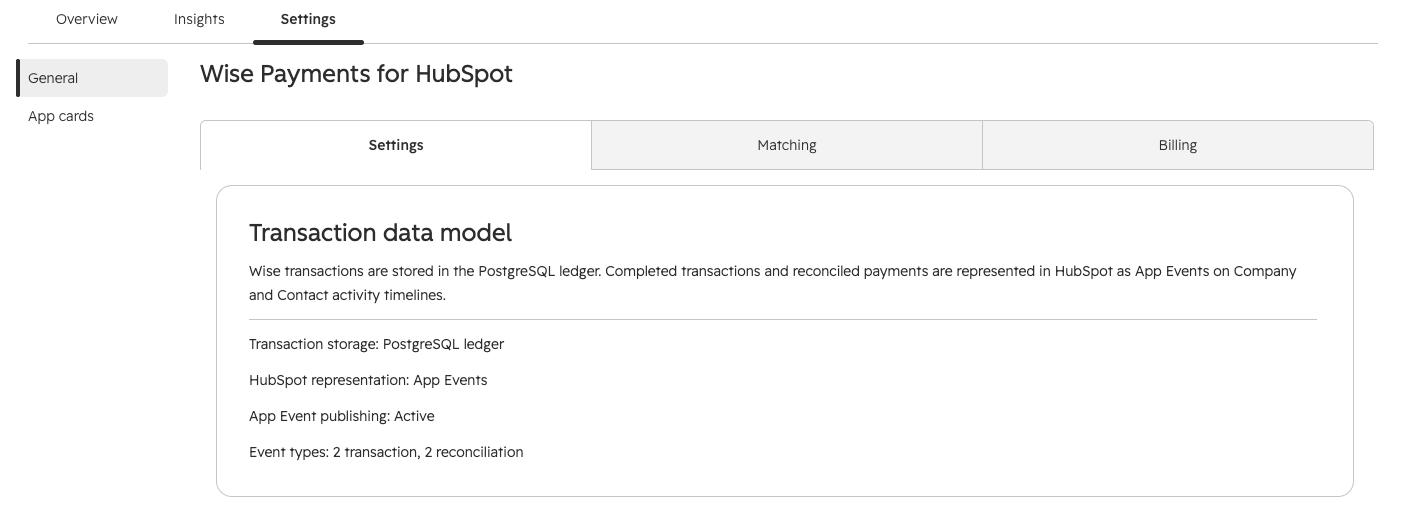
Wise transactions are stored in the application PostgreSQL transaction ledger. Completed transactions and reconciled payments are represented in HubSpot as App Events on associated Company and Contact timelines.
Wise account connection
Connect with a Wise personal API token, select one Wise profile, and synchronize balance-statement history from the live Wise API.
CRM representation
Use App Events, the Wise Transaction Manager CRM card, invoice reconciliation, and the Reconcile Wise payment workflow action.
What the current app includes
- HubSpot OAuth installation with a minimal production scope set.
- $29 USD/month subscription with a 14-day free trial through Stripe Checkout.
- Live Wise personal API token connection with encrypted token storage.
- Read-only and Read and create Wise connection modes.
- One selected Wise profile per HubSpot account.
- 30, 90, 180, 365, or 730-day transaction history windows.
- PostgreSQL transaction ledger with portal/profile/transaction idempotency.
- Four HubSpot App Event definitions for completed transactions and reconciled payments.
- A Matching tab for unresolved external counterparties.
- A Wise Transaction Manager CRM card on Company and Contact records.
- Incoming-payment webhook monitoring from Wise.
- HubSpot invoice matching and Commerce Payment creation.
- An invoice workflow action for targeted historical reconciliation.
Requirements
To install and use the current production integration, you need:
- A HubSpot account where the installing user can authorize Marketplace apps.
- Access to the HubSpot Companies, Contacts, Invoices, Commerce Payments, and App Events capabilities covered by the requested scopes.
- A live Wise account and a personal API token that can access the Wise profile to be synchronized.
- At least one eligible Wise balance for transaction synchronization.
- An active 14-day trial, active subscription, or other account entitlement recognized by the app.
- For the invoice workflow action, HubSpot workflow access that supports invoice-based workflows and installed app actions.
HubSpot subscription level, object availability, workflow access, and user permissions can affect whether invoice, Commerce Payment, workflow, and other APIs are usable in a specific account.
Install and configure the integration
Install in HubSpot
- Open the Wise Payments for HubSpot Marketplace installation flow.
- Select the HubSpot account you want to connect.
- Review the requested HubSpot permissions.
- Approve the installation and allow the HubSpot OAuth callback to complete.
- Return to HubSpot and open Wise Payments for HubSpot settings.
After HubSpot OAuth completes, the application:
- Stores portal-specific HubSpot OAuth token state for API access and refresh.
- Initializes the HubSpot account's app settings without overwriting existing saved settings.
Complete first-time setup
- Open Billing and start the 14-day free trial if the account is not already entitled.
- Return to Settings and connect a live Wise personal API token.
- Select the Wise profile to synchronize.
- Select the transaction history window.
- Save settings so the selected profile and incoming-payment listener can be configured.
- Run Test connection.
- Run Synchronize transactions.
- Open Matching to map any unresolved external counterparties.
Current settings tabs
| Tab | Purpose |
|---|---|
| Settings | Transaction data model, Wise connection, profile selection, history window, listener activation, connection testing, synchronization, and synchronization status. |
| Matching | Review unresolved external Wise counterparties, search existing HubSpot Companies or Contacts, and save confirmed mappings. |
| Billing | Plan, trial/subscription status, Stripe Checkout, and access to the Stripe billing portal. |
Trial, subscription, and billing portal
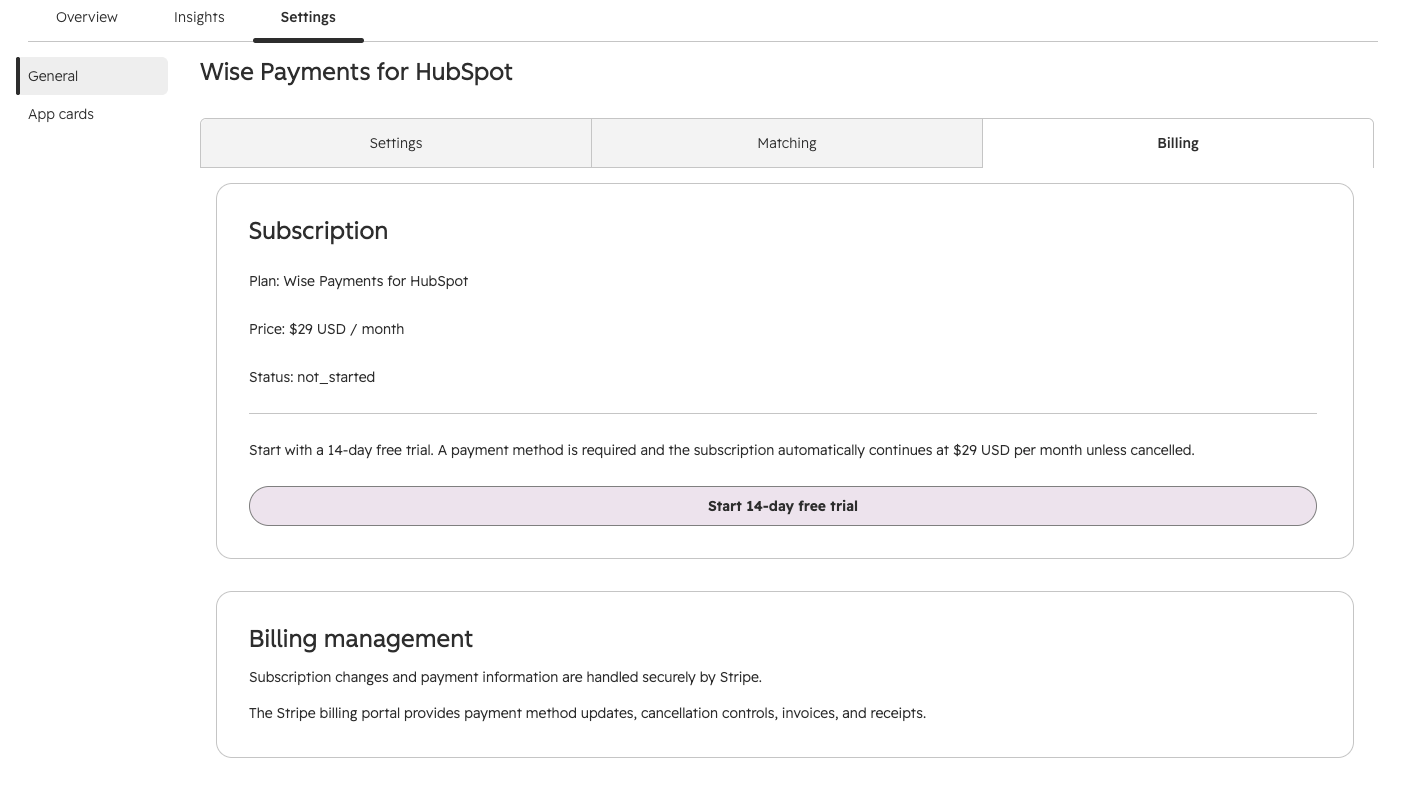
The standard Wise Payments for HubSpot plan is $29 USD per month after a 14-day free trial. Subscription checkout and billing management are handled through Stripe.
Start the free trial
- Open the Billing tab.
- Select Start 14-day free trial.
- Continue to Stripe Checkout.
- Add a valid payment method and complete Checkout.
- Return to HubSpot and reload the app if the billing status has not refreshed yet.
A payment method is required for the standard trial. Unless cancelled, the subscription continues at $29 USD/month when the trial ends.
Billing access
You can use the app while your 14-day trial is active or while you have an active subscription. If a payment is temporarily overdue, access may continue while the billing issue is resolved. If the trial ends or the subscription is no longer active, features such as transaction synchronization, workflow actions, and settings changes may become unavailable until billing is restored. Some early-access accounts may have permanent access without a paid subscription.
Manage billing
After a Stripe customer exists, use Manage billing to open the Stripe-hosted billing portal. Use it to update payment methods, manage cancellation, and view Stripe invoices and receipts.
The app stores Stripe customer, subscription, Checkout-session, price, trial, billing-period, cancellation, and invoice-status metadata. Full card numbers and CVC values are handled by Stripe and are not stored by the Wise Payments application.
Connect a live Wise account
Wise is connected with a personal API token. The token is validated against the live Wise Profiles API before it is stored.
Create a Wise personal API token
Create the API token directly in the live Wise account before connecting the app. Use a web browser and make sure you are viewing the Wise Business profile that contains the balances and transactions you want to synchronize with HubSpot.
- Sign in to Wise.com in a web browser.
- Switch to the Wise Business profile you want to connect to HubSpot.
- Open Your Account.
- Select Connect and manage apps.
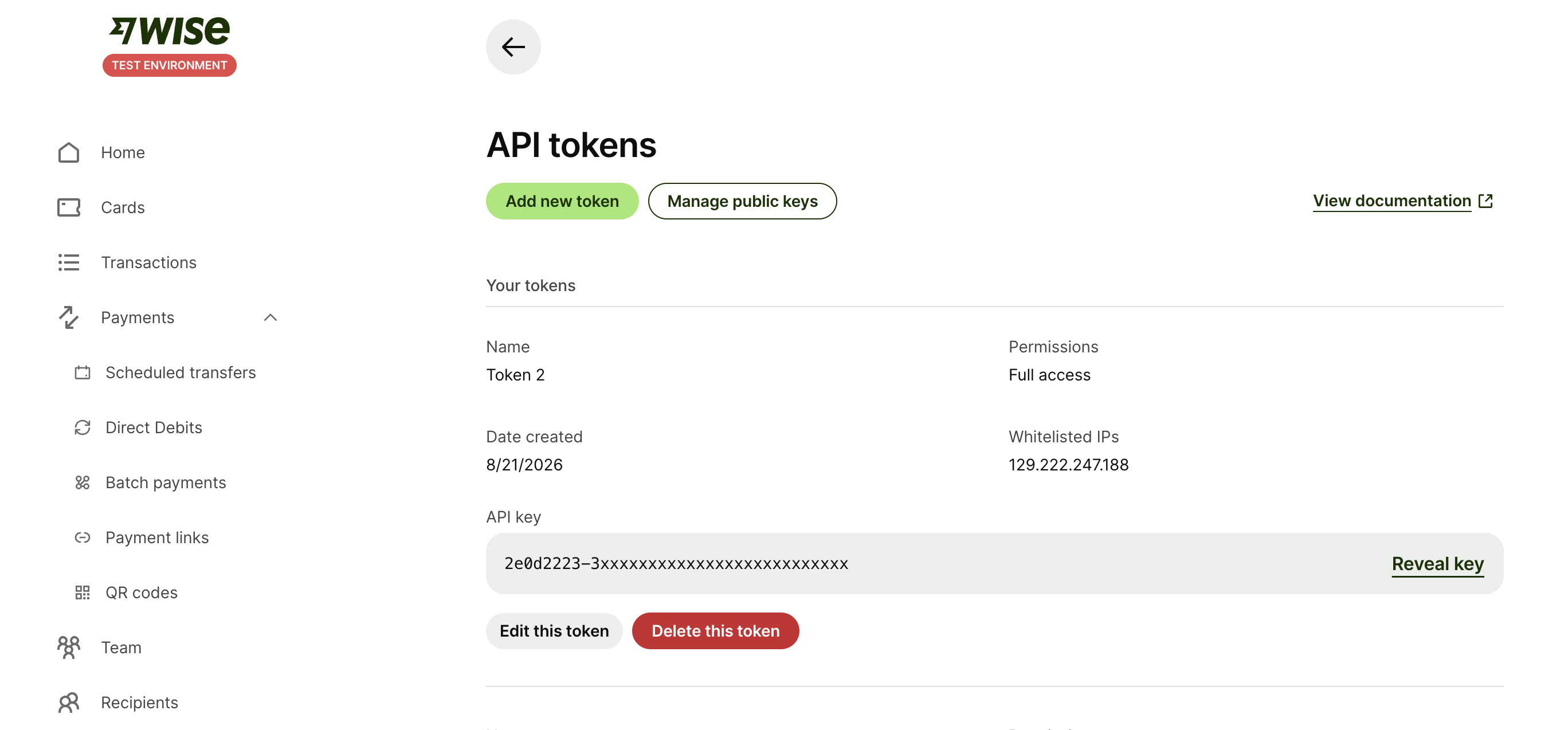
- Open API tokens.
- Select Add new token.
- Complete Wise 2-step verification when prompted.
- Copy the new personal API token immediately. Wise displays the token only once.
Do not email the token, paste it into a support ticket, store it in a shared document, or commit it to source control. If the token is exposed, revoke it in Wise and create a replacement token.
Connect the Wise token in HubSpot
- Open the app's Settings tab.
- Select the app access level.
- Paste the Wise personal API token into the password field.
- Select Connect Wise.
- If the profile is not selected automatically, choose the intended Wise profile.
- Save settings and run Test connection.
Access levels
| Access level | Current behavior |
|---|---|
| Read-only | Supports the current synchronization and reconciliation flow. The app can also configure the Wise webhook subscription required for inbound payment monitoring; that configuration action does not send money. |
| Read and create | Allows supported Wise write requests in addition to reads. The current production reconciliation workflow does not initiate or send a Wise transfer. |
Use Read-only unless a documented feature specifically requires broader Wise write capability. Normal transaction synchronization, matching, App Events, invoice reconciliation, and HubSpot Commerce Payment creation do not send funds through Wise.
Wise token handling
The application encrypts the Wise personal API token before persistence. The saved token is not returned to the HubSpot UI. Personal API tokens do not use an OAuth refresh-token cycle; reconnect if Wise revokes the token or the stored credential can no longer be decrypted.
Wise profile and transaction history settings
Profile selection
One Wise profile is selected per HubSpot account at a time. If the connected token can access exactly one profile, or exactly one business profile among several profiles, the app can select it automatically. Otherwise the user selects a profile manually.
The selected profile controls:
- Which Wise balances and currencies are read.
- Which COMPACT balance statements are synchronized.
- Which saved counterparty mappings are applied during synchronization.
- Which incoming-payment webhook subscription is configured.
- The Wise profile ID stored with ledger transactions and App Event publications.
Transaction history window
| Setting | History requested from Wise |
|---|---|
| 30 days | Previous 30 days |
| 90 days | Previous 90 days |
| 180 days | Previous 180 days |
| 1 year | 365 days; current default |
| 2 years | 730 days |
Reducing the synchronization window does not delete transactions already stored in the ledger, saved mappings, previously published App Events, or existing HubSpot Commerce Payments.
Transaction synchronization
Run a synchronization
- Connect Wise and select the intended profile.
- Select the required history window.
- Run Test connection.
- Select Synchronize transactions.
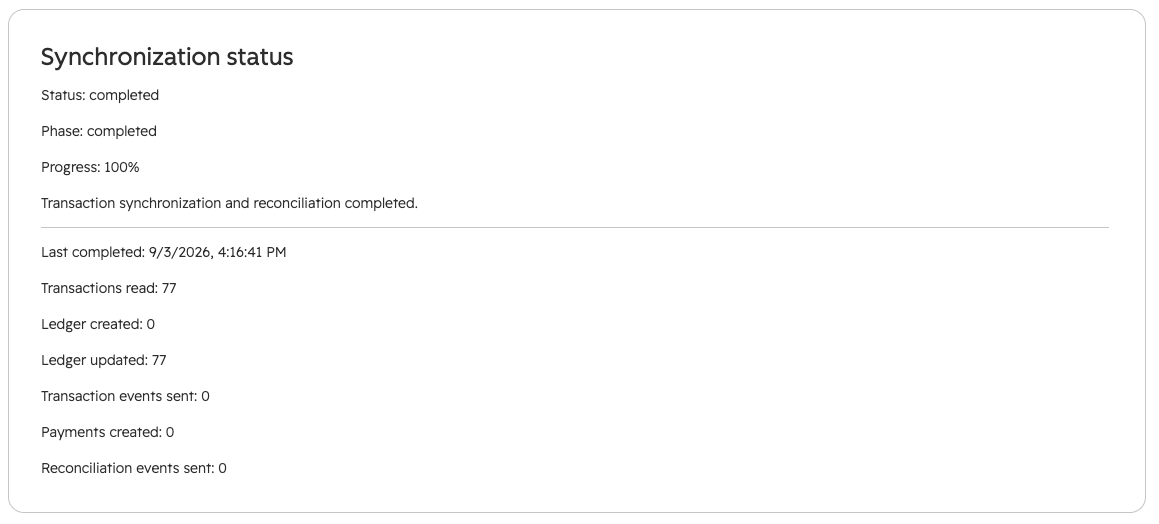
- Monitor the queued, running, completed, completed-with-errors, or failed job status.
- Review created/updated ledger counts, App Event counts, and payment-reconciliation results.
What the synchronization job does
- Reads balances for the selected Wise profile.
- Splits the configured history into supported Wise statement windows.
- Requests COMPACT balance statements for each eligible balance/currency.
- Normalizes statement entries into the app's common transaction model.
- Deduplicates the current retrieval by Wise transaction ID.
- Upserts transactions into the portal/profile/transaction ledger.
- Applies saved counterparty mappings to create or update transaction targets.
- Queues and publishes eligible completed transaction App Events.
- Runs invoice reconciliation against completed incoming Wise transactions.
Ledger identity and duplicate prevention
The PostgreSQL ledger primary key is the combination of HubSpot account ID, Wise profile ID, and Wise transaction ID. A later synchronization updates that row rather than intentionally inserting a second copy of the same transaction.
Stored transaction information
- HubSpot account ID and Wise profile ID.
- Wise transaction and balance IDs.
- Transaction date, amount, currency, direction, status, and normalized type.
- Counterparty name and available counterparty account identifier.
- Reference, description, and Wise transfer ID when available.
- The normalized property set used by App Events and record views.
- The source transaction payload returned by Wise.
Map unresolved Wise counterparties
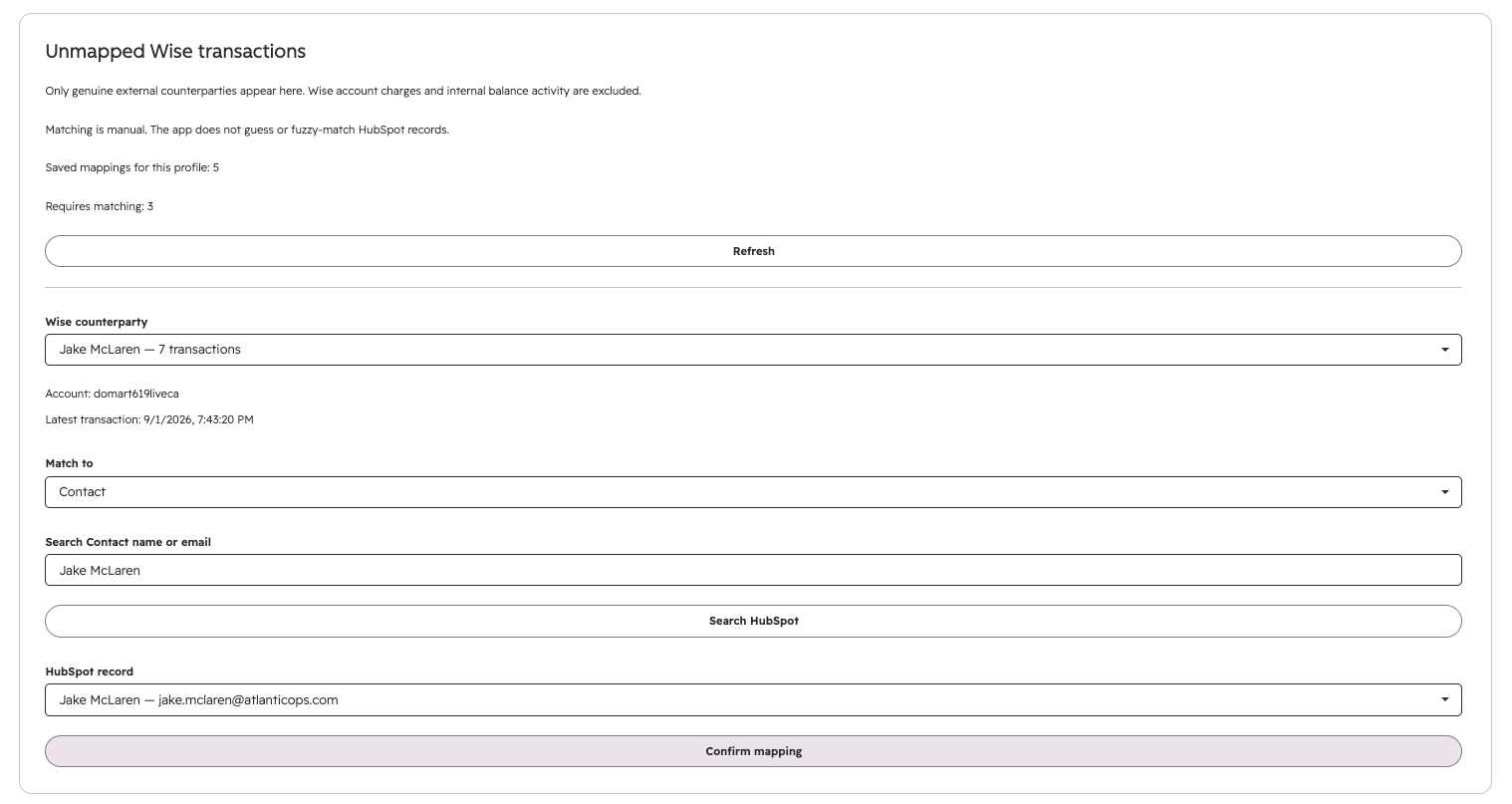
The Matching tab is the preferred place to review genuine external Wise counterparties that are not yet mapped to HubSpot. Internal Wise account charges and balance activity are excluded from the review queue.
The current matching flow does not guess, fuzzy-match, or automatically create a Company or Contact. A HubSpot user searches for an existing record, selects it, and confirms the mapping.
Confirm a mapping
- Open the Matching tab.
- Select an unresolved Wise counterparty.
- Choose whether to search Companies or Contacts.
- Search by Company name/domain or Contact name/email.
- Select the correct HubSpot record.
- Confirm the mapping.
When a mapping is confirmed, the app:
- Saves a portal- and Wise-profile-specific counterparty mapping.
- Associates already stored matching ledger transactions with that HubSpot target.
- Publishes eligible completed App Events for those mapped transactions.
- Reuses the confirmed mapping during later synchronization when the counterparty identity matches.
The mapping key can use Wise profile, normalized counterparty name, and available counterparty account information. If account data is absent on one side, the app can fall back to the normalized counterparty name for an existing confirmed mapping.
Wise Transaction Manager on Companies and Contacts
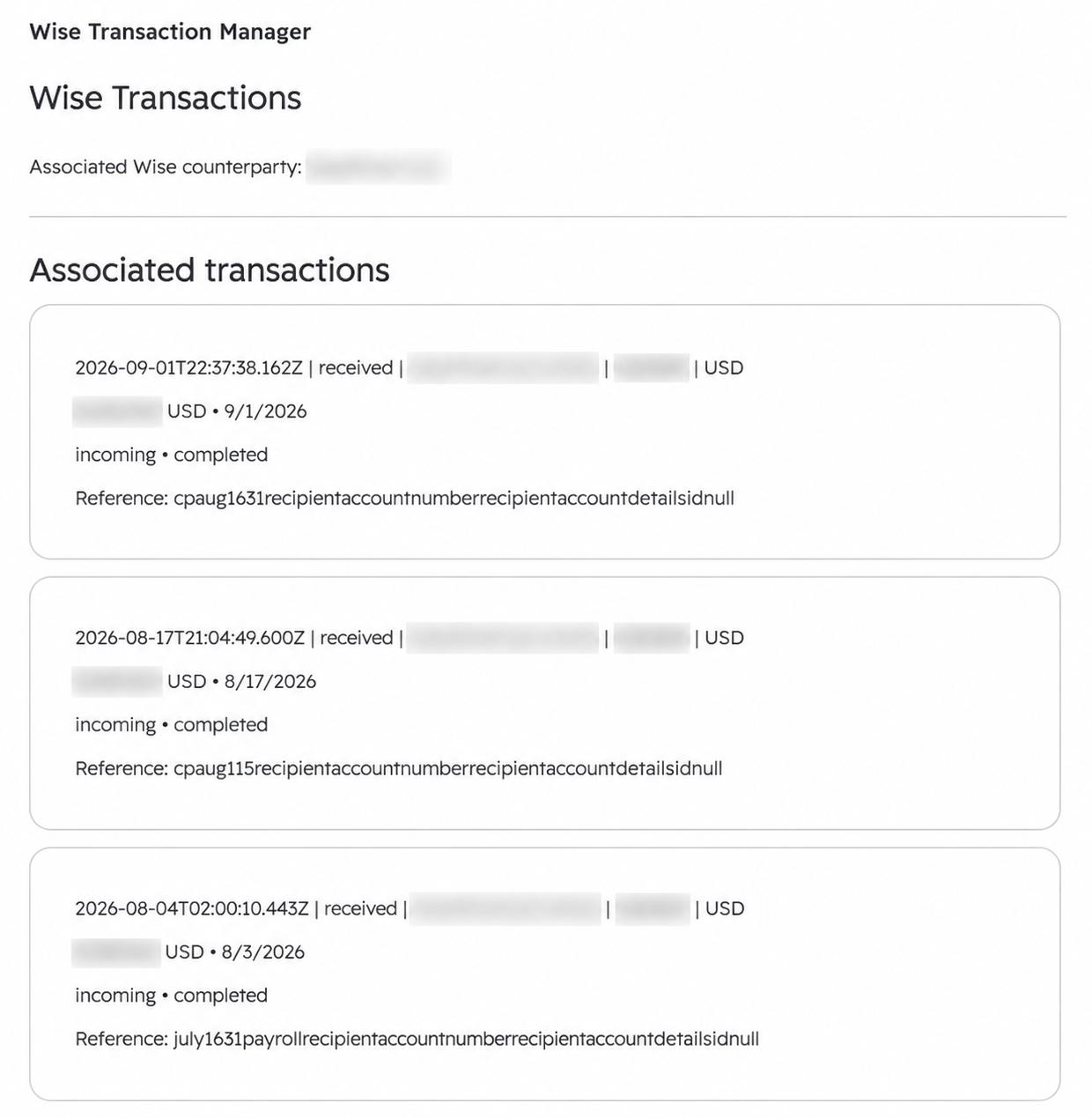
The Wise Transaction Manager card is available on HubSpot Company and Contact records. It reads from the application ledger and shows transactions that have application-side transaction targets for the current record.
Manual record-level association
- Open a HubSpot Company or Contact.
- Open the Wise Transaction Manager card.
- If the record has no associated counterparty, select one from the ledger.
- Select Save manual association.
- Review the associated transactions shown on the record.
The CRM card targets currently stored ledger transactions for the selected exact counterparty name to the current record. The Settings Matching tab also saves a reusable counterparty mapping that can be applied during later synchronizations. Use Matching when you want a durable mapping for future imports.
These are application ledger targets, not a custom Wise transaction object and not a HubSpot Company/Contact custom-property writeback.
Incoming payment monitoring
When profile settings are saved, the app attempts to ensure a Wise profile webhook subscription for account-details-payment#state-change using schema version 4.0.0.
Webhook processing
- Wise delivers the event to a portal-specific application webhook URL.
- The app verifies the Wise x-signature-sha256 signature against the original request body using RSA-SHA256.
- Test notifications are accepted without running a transaction reconciliation job.
- Non-matching event types and non-completed states are ignored.
- If the event contains a profile ID, it is checked against the selected Wise profile.
- Delivery IDs are reserved to reduce duplicate processing.
- A completed incoming-payment event queues a short transaction ingestion sync and invoice reconciliation.
Webhook-triggered ingestion currently uses a shorter synchronization history window than a user-selected manual historical synchronization. Manual synchronization can be used to recover eligible transactions if a webhook delivery fails.
The app specifically allows Wise profile webhook-subscription configuration for a connected Read-only account because this configures inbound event delivery and does not create or send a Wise payment.
HubSpot invoice reconciliation
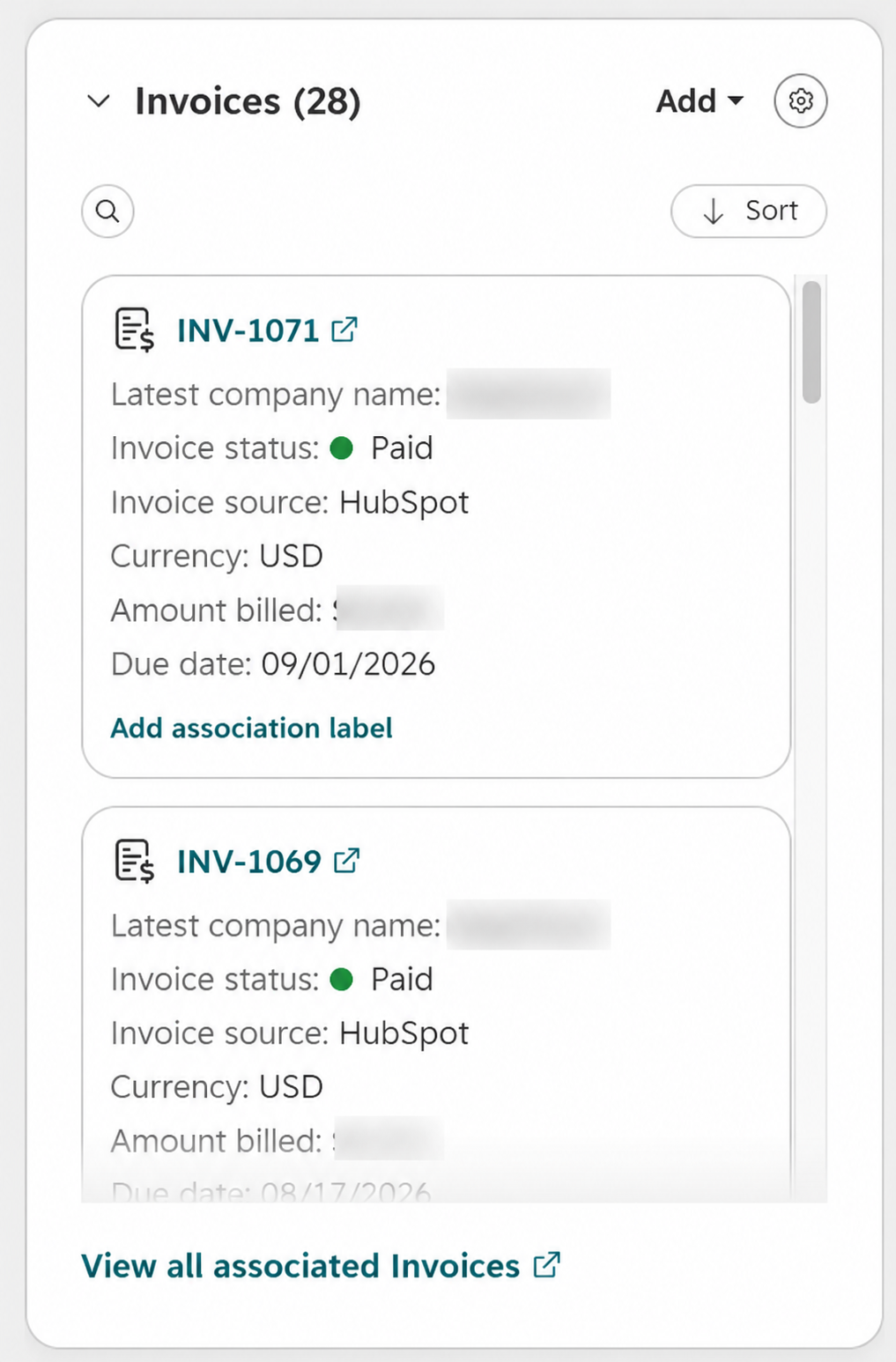
Reconciliation checks completed incoming Wise transactions in the application ledger against HubSpot invoices whose hs_invoice_status is open. A Commerce Payment is created only when a sufficiently unique match is found.
Invoice data read
- Invoice number and status.
- Currency.
- Amount billed, invoice total, total amount, subtotal, and balance due as supported amount candidates.
- Due date, invoice date, and creation date.
- Associated Companies and Contacts.
Match order
| Priority | Method | Requirements |
|---|---|---|
| 1 | Invoice reference | Currency and amount match, and the normalized Wise reference or description identifies the HubSpot invoice number. |
| 2 | Shared Company/Contact + date + amount | The transaction target and invoice share a mapped Company or Contact, currency matches, candidate invoices are ranked by date distance, and amount matches within the closest eligible date group. |
Invoice match date is due date first, then invoice date, then creation date. An exact date is recorded as an exact-date match; up to seven days is a date-window match; a uniquely selected candidate farther away can be classified as a retroactive-date match.
If more than one candidate remains equally eligible at the selected match level, the app records an ambiguous outcome instead of choosing an invoice arbitrarily.
Reconcile a historical payment from an invoice workflow
The published HubSpot invoice workflow action is named Reconcile Wise payment. It checks the enrolled invoice against completed incoming transactions already present in the application ledger.
- Create an invoice-based HubSpot workflow.
- Choose the invoice enrollment criteria.
- Add Wise Payments for HubSpot → Reconcile Wise payment.
- Publish and enroll the intended invoice records.
- Review the workflow output and resulting Commerce Payment/App Event.
Workflow outputs
| Output | Type | Meaning |
|---|---|---|
| reconciliationResult | String | Can return payment_created, already_processed, ambiguous, invoice_not_open, or a diagnostic JSON string for no_match. |
| paymentId | String | HubSpot Commerce Payment ID when available. |
| paymentsCreated | Number | Number of Commerce Payments created by this execution. |
Historical payment date
When a Commerce Payment is created, hs_initiated_date is based on the original Wise transaction timestamp, not the date the workflow ran.
If the historical payment has not been synchronized, first run a manual transaction synchronization with a history window that includes the payment date.
HubSpot Commerce Payment creation
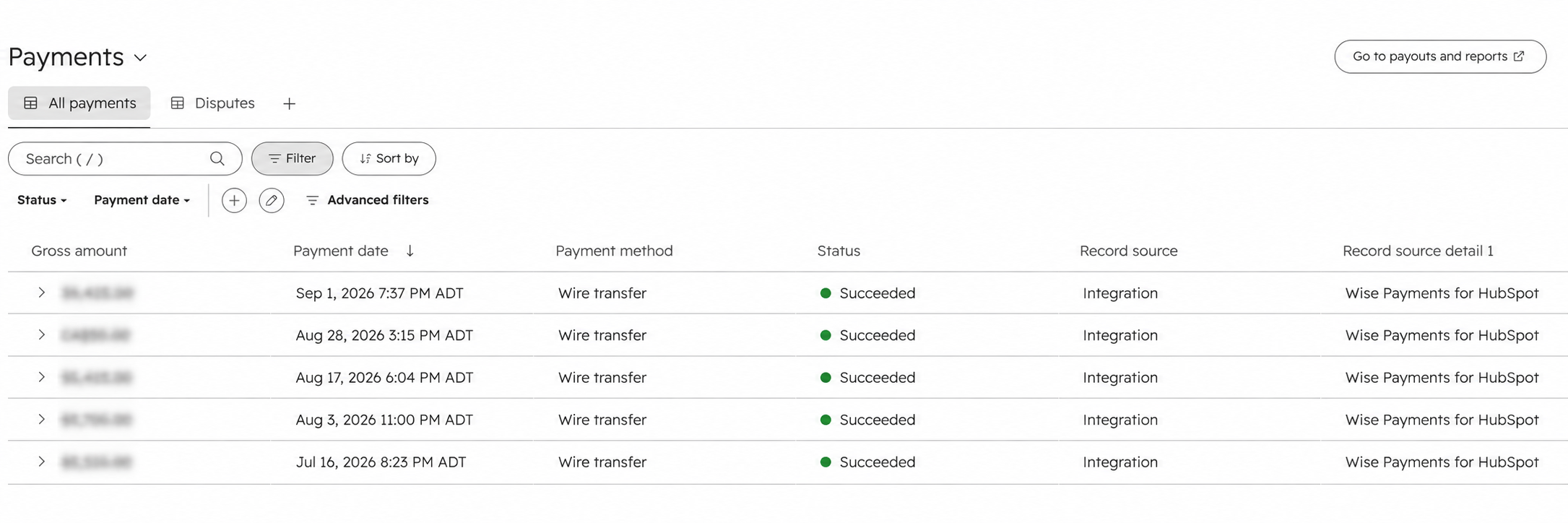
A unique invoice reconciliation creates a HubSpot Commerce Payment unless a payment already exists with the deterministic Wise reference for the transaction.
| HubSpot property | Value |
|---|---|
| hs_initial_amount | Absolute normalized Wise transaction amount. |
| hs_initiated_date | Original Wise transaction timestamp. |
| hs_currency_code | Wise transaction currency. |
| hs_latest_status | succeeded |
| hs_payment_method_type | wire_transfer |
| hs_processor_type | none |
| hs_reference_number | WISE:{Wise transaction ID} |
| hs_internal_comment | Wise transaction ID plus available Wise reference, counterparty, and matched invoice number. |
The payment is created with HubSpot's payment-to-invoice association so it is attached to the matched invoice immediately.
Duplicate prevention
Before creating a payment, the app searches Commerce Payments for the exact reference WISE:{transactionId}. If found, the result is already_processed and the existing payment ID is reused.
Commerce Payment creation records an incoming payment in HubSpot. It does not initiate a Wise transfer, debit, payout, or other movement of funds.
HubSpot data model and App Events
Current HubSpot representation
The app uses App Events rather than a Wise custom object or provisioned Company/Contact properties for transaction history.
| App Event UID | Object | Purpose |
|---|---|---|
| wise_transaction_completed_company | Company | Completed Wise transaction associated with a Company. |
| wise_transaction_completed_contact | Contact | Completed Wise transaction associated with a Contact. |
| wise_payment_reconciled_company | Company | Wise payment reconciled to a HubSpot invoice and Commerce Payment for a Company-related target. |
| wise_payment_reconciled_contact | Contact | Wise payment reconciled to a HubSpot invoice and Commerce Payment for a Contact-related target. |
Completed transaction event data
Event properties can include Wise transaction/profile/balance IDs, transaction type, direction, completion date, source/target amounts and currencies, exchange rate, fees, reference, description, counterparty information, recipient/transfer/payment-request identifiers when available, and CRM match method/confidence.
Reconciliation event data
Reconciliation events include the Wise transaction identity, amount/currency/date, counterparty, HubSpot invoice ID/number, Commerce Payment ID/reference, observed invoice status, reconciliation action, match method, association type, and date distance.
HubSpot OAuth scopes
The current Marketplace app requests the following required scopes. There are no optional or conditionally required scopes in the current manifest.
| Scope | Why the app uses it |
|---|---|
| oauth | Completes installation, stores portal-specific OAuth token state, and refreshes HubSpot access when required. |
| crm.objects.companies.read | Searches/reads Companies for explicit counterparty mapping and reads Company association context used by reconciliation. |
| crm.objects.contacts.read | Searches/reads Contacts for explicit counterparty mapping and reads Contact association context used by reconciliation. |
| crm.objects.invoices.read | Reads open invoices, invoice properties, and Company/Contact associations for reconciliation. |
| crm.objects.commercepayments.read | Checks for an existing Commerce Payment with the deterministic Wise reference. |
| crm.objects.commercepayments.write | Creates a Commerce Payment and associates it to a uniquely matched invoice. |
| timeline | Publishes completed transaction and payment-reconciliation App Events to Company and Contact timelines. |
The app does not currently request Company write, Contact write, Company schema, or Contact schema scopes.
Data flows and external services
| Data/service | Direction | Current purpose |
|---|---|---|
| Wise profiles | Wise → app | Validate the token and select the profile to synchronize. |
| Wise balances | Wise → app | Identify eligible balance IDs and currencies. |
| Wise COMPACT statements | Wise → app | Retrieve transaction history for normalization and ledger storage. |
| Wise webhook subscriptions | App ↔ Wise | Inspect/create the selected profile's incoming-payment state-change listener. |
| Wise incoming-payment webhooks | Wise → app | Trigger short ingestion/reconciliation after completed payment state changes. |
| Companies and Contacts | HubSpot → app | Explicit matching search and association context. |
| Invoices | HubSpot → app | Read open invoice numbers, amounts, currencies, dates, status, and associations. |
| Commerce Payments | HubSpot ↔ app | Read for duplicate prevention and create reconciled payment records. |
| App Events | App → HubSpot | Publish completed transaction and reconciliation activity. |
| Workflow invocation | HubSpot → app | Identify a specific enrolled invoice for targeted reconciliation. |
| Billing state | Stripe ↔ app | Checkout, subscription entitlement, cancellation state, and billing-portal access. |
Data processed from Wise
- Profile identifiers, type, and profile display details.
- Balance identifiers and currencies.
- Transaction/transfer identifiers, dates, amounts, currencies, direction, status, and type.
- Counterparty names and available account identifiers.
- References, descriptions, fees, and exchange/source/target details when available.
- Incoming-payment webhook delivery and resource metadata.
Data processed from HubSpot
- HubSpot account ID and OAuth token state.
- Company and Contact IDs plus selected search/display properties and associations.
- Invoice IDs, numbers, statuses, amounts, currencies, dates, and associations.
- Commerce Payment IDs, references, statuses, and invoice association information.
- Workflow origin information identifying an enrolled invoice.
The customer-facing production flow reads Wise financial activity and writes CRM/payment records to HubSpot. It does not initiate a live Wise transfer or send funds from HubSpot.
Hosting, storage, and retention
Application hosting
The current production application endpoint is wise-hubspot.onrender.com. HubSpot UI extensions, the OAuth callback, the workflow action, and the backend integrations currently use that service.
This product guide does not make a contractual claim about database region, backup schedule, data residency, RTO, RPO, SOC 2, or ISO 27001 status. Contact Atlantic Ops for current vendor-review or contractual documentation when those details are required.
Production application storage
The production data model uses PostgreSQL. Two storage patterns are used:
| Storage area | Contents |
|---|---|
| Dedicated ledger tables | wise_transaction_ledger, wise_transaction_targets, and wise_app_event_publications. |
| Application key/value storage | Portal settings, HubSpot OAuth state, Wise connection metadata/encrypted token, counterparty mappings, billing metadata, job status, webhook delivery state, and related app state stored as JSONB values. |
The codebase also contains a local JSON-file fallback when PostgreSQL is not configured. That fallback is intended for development/fallback operation; the production UI and current architecture identify PostgreSQL as the transaction store.
Transaction ledger
Ledger rows are keyed by HubSpot account ID + Wise profile ID + Wise transaction ID. The ledger stores both normalized transaction fields and the source transaction payload returned by Wise. Transaction targets separately link a ledger transaction to a HubSpot Company or Contact record ID. App Event publication records track pending/sent state, attempts, errors, and event payloads.
Retention
- Wise webhook delivery-deduplication records are pruned after approximately 30 days and capped at 500 delivery records per HubSpot account.
- The app does not currently expose an automatic expiration setting for transaction-ledger history, counterparty mappings, OAuth state, billing metadata, or App Event publication history.
- Disconnecting Wise removes the active credential connection but preserves transaction history.
- Reducing the history window affects future Wise statement requests; it does not delete existing ledger history.
- Uninstalling the HubSpot app does not automatically delete data already written into HubSpot.
- Application-side data deletion can be requested through Atlantic Ops support.
Security controls and risk considerations
Wise personal API token
- The token is validated against the live Wise Profiles API before it is saved.
- It is encrypted before persistence with AES-256-GCM.
- Encryption uses a random 12-byte initialization vector and an authentication tag.
- The 256-bit encryption key is derived from a server-side secret that must contain at least 32 characters.
- The encrypted token is not returned to the HubSpot UI.
- If the token cannot be decrypted, the connection is moved into a reconnect-required state.
HubSpot OAuth credentials
HubSpot access and refresh token state is stored server-side in portal-specific application storage and refreshed as required. It is not displayed in the HubSpot UI. The Wise-token AES-256-GCM helper is not applied to the HubSpot OAuth token store; protection at rest therefore depends on the application/database hosting controls.
Webhook and request verification
- Wise incoming-payment webhooks are verified with RSA-SHA256 using the original request body and Wise public key.
- Stripe billing webhooks are verified with the configured Stripe webhook secret before billing state is accepted.
- HubSpot V3 request-signature validation is used for sensitive Wise credential onboarding, billing operations, and the published workflow action.
- Signed HubSpot request timestamps older than five minutes are rejected by the V3 signature validator.
- Protected app actions also pass through billing-entitlement checks where applicable.
Payment and financial data
- The integration never asks for or stores a Wise account password.
- Stripe Checkout/customer portal handles full card details; the app does not store full card numbers or CVCs.
- The transaction ledger stores financial transaction metadata and the source Wise transaction payload needed for synchronization and reconciliation.
- Do not send API tokens, OAuth tokens, webhook secrets, database credentials, or full bank-account details to support.
Operational safeguards
- Minimal HubSpot scopes are requested for the current feature set.
- CRM matching is user-confirmed rather than fuzzy or automatic.
- Invoice ambiguity is not automatically resolved.
- Transaction, webhook-delivery, App Event, and Commerce Payment idempotency controls reduce accidental duplicate processing.
- Recording a HubSpot Commerce Payment does not move funds through Wise.
The application backend contains implementation endpoints used by HubSpot extensions, webhooks, billing, and workflow actions. Customers should use the installed HubSpot interfaces rather than treating backend routes as a versioned public API.
Disconnecting Wise, cancelling billing, and uninstalling
Disconnect Wise
- Open the Settings tab.
- Select Disconnect Wise.
- Reconnect later with a new live personal API token if required.
Disconnecting Wise:
- Clears the active Wise credential connection.
- Clears the selected Wise profile from the app settings.
- Stops future authenticated Wise API requests until reconnected.
- Preserves existing transaction-ledger history and HubSpot data already created.
Disconnecting the credential does not itself confirm that a previously created Wise webhook subscription has been deleted. Contact support if you are ending service and need the listener state confirmed or removed.
Cancel billing
Use Billing → Manage billing to open the Stripe portal and manage cancellation. HubSpot app uninstall and Stripe subscription cancellation are separate actions.
Uninstall from HubSpot
- Cancel/manage the Stripe subscription if billing should stop.
- Disconnect Wise.
- Open HubSpot connected-app settings.
- Select Wise Payments for HubSpot and uninstall the app.
If you uninstall the app, it will stop connecting to your HubSpot account and the app's tools will no longer appear in HubSpot. Information already added to HubSpot—such as payment records, invoice links, and Wise activity on Company or Contact timelines—may remain in your account after the app is removed.
Request application-side data deletion
Contact Atlantic Ops support and provide the HubSpot account ID, organization name, requesting administrator information, and the requested deletion scope. Deleting application-side data does not automatically delete data already stored in HubSpot.
Troubleshooting
The app says a trial or subscription is required
- Open Billing and confirm the current subscription status.
- If billing has not started, complete the 14-day trial checkout.
- If payment details or cancellation state needs attention, use Manage billing.
- Return to HubSpot and reload the app after changing Stripe billing information.
Wise will not connect
- Confirm the token was created in a live Wise account.
- Confirm the token can read at least one Wise profile.
- Confirm an existing Wise connection has been disconnected before replacing the token.
- If Wise revoked the token, create a new personal API token and reconnect.
- If the UI reports that secure credential storage is not configured, contact support.
No Wise profiles appear
- Confirm the token owner can access the intended profile.
- Reconnect the token if profile access changed.
- Run Test connection after selecting the intended profile.
No balances or currencies appear
- Confirm the correct Wise profile is selected.
- Confirm the profile contains eligible balances.
- Run Test connection.
- Confirm the personal API token remains valid.
No transactions are synchronized
- Confirm the balance contains activity inside the selected history window.
- Use a longer history window if the expected payment is older.
- Run a manual synchronization and review statement errors in the synchronization result.
- Longer history periods can require several balance-statement requests.
The Matching queue is empty
- Run synchronization first.
- Confirm the intended Wise profile is selected.
- Counterparties already mapped are not unresolved.
- Internal Wise account charges and balance activity are intentionally excluded from the queue.
I cannot find the right HubSpot record in Matching
- Switch between Company and Contact search.
- Search Companies by name or domain.
- Search Contacts by name or email.
- Confirm the record already exists in HubSpot; the app does not create it automatically.
Transactions are not visible on a Company or Contact
- Use the Settings Matching tab to create a durable counterparty mapping, or use the Wise Transaction Manager card for a record-level association.
- Run synchronization again after creating a durable mapping so future imported transactions can receive targets.
- Only completed mapped transactions are eligible for the completed-transaction App Events.
An incoming payment did not appear automatically
- Save profile settings to ensure the incoming-payment listener is configured.
- Confirm the selected Wise profile is correct.
- Run a manual synchronization; statement ingestion can recover eligible activity after webhook failure.
- If the issue persists, contact support with the HubSpot account ID, approximate payment time, profile, amount, and currency. Do not send the Wise API token.
An invoice was not matched
- Confirm the Wise transaction is incoming and completed.
- Confirm the invoice status is open.
- Confirm transaction and invoice currencies match.
- Confirm the amount matches a supported invoice amount field.
- Check whether the invoice number is present in the Wise reference or description.
- If reference matching is unavailable, confirm the transaction and invoice share the same mapped Company or Contact.
- Confirm the invoice has a usable due date, invoice date, or creation date.
The workflow returned no_match
- Confirm the historical Wise transaction is already in the ledger.
- Run a longer manual history synchronization if necessary.
- Confirm the enrolled invoice is still open.
- Review amount, currency, date, invoice number/reference, and shared CRM association data.
The workflow returned ambiguous
More than one invoice candidate remained equally eligible. Review invoice dates, amount, currency, reference, and Company/Contact associations before running it again.
A duplicate Commerce Payment appears
The app checks for WISE:{transactionId} before creating a payment. Contact support with the HubSpot account ID, Wise transaction ID, invoice ID, and related Commerce Payment IDs so the records can be investigated.
Frequently asked questions
How much does Wise Payments for HubSpot cost?
The standard plan is $29 USD/month after a 14-day free trial.
Is a payment method required for the free trial?
Yes for the standard Stripe trial. The subscription continues at $29 USD/month unless cancelled.
Does the current app support Wise Sandbox?
No. The current production release connects to live Wise using a personal API token. Sandbox testing and Stripe Test Mode are not customer-facing production features.
Does the app send money through Wise?
No. Current customer-facing synchronization and reconciliation read Wise activity and create CRM/payment records in HubSpot; they do not initiate a live Wise transfer.
Where are Wise transactions stored?
In the application's PostgreSQL transaction ledger. HubSpot receives completed-transaction and reconciliation activity as App Events.
Does the app create a Wise transaction custom object in HubSpot?
No. The current architecture is PostgreSQL ledger + HubSpot App Events.
Does installation create custom Company or Contact properties?
No. The current production installation does not provision a Wise Integration property group and does not request Company/Contact schema-write scopes.
Does the app automatically create Companies or Contacts?
No. Matching uses existing HubSpot records and requires the user to confirm the correct Company or Contact.
Does the app fuzzy-match counterparties?
No. The active Matching interface uses explicit search and user confirmation. Saved confirmed mappings are then reused during later synchronization.
Can I synchronize several Wise profiles at the same time?
No. One Wise profile is selected for a HubSpot account at a time.
Are multiple currencies supported?
Yes. Transactions retain their Wise currency. Invoice reconciliation requires transaction and invoice currency to match.
Can an older Wise payment be reconciled later?
Yes. Synchronize enough history to place the payment in the ledger, then use normal reconciliation or the Reconcile Wise payment invoice workflow action. A newly created Commerce Payment uses the original Wise transaction timestamp.
Does disconnecting Wise delete historical transactions?
No. Disconnecting removes the active Wise credential connection and selected profile but preserves existing transaction history.
Does uninstalling the HubSpot app cancel Stripe billing?
No. Manage or cancel the Stripe subscription separately through the Billing tab before uninstalling if billing should stop.
How do I request deletion of application-side data?
Contact Atlantic Ops support with the HubSpot account ID and the requested deletion scope. HubSpot-side records are managed separately in the customer's HubSpot account.
Privacy, legal, and support
When contacting support, include the HubSpot account ID and enough non-secret context to identify the affected Wise profile, transaction, Company, Contact, invoice, workflow execution, Commerce Payment, synchronization job, or billing state.
Do not include Wise personal API tokens, HubSpot OAuth tokens, Stripe secret keys, webhook secrets, database credentials, full payment-card details, or full bank-account credentials in support requests.
Contact Atlantic Ops support
Get help with installation, billing, Wise connection, synchronization, matching, incoming-payment monitoring, invoice reconciliation, workflow backdating, Commerce Payments, or application-side data deletion.